
For a while, traffic from AI platforms like ChatGPT, Gemini, and Claude lived in an awkward gray zone in your analytics. Some of it showed up under Referral. Some disappeared into Unassigned or Direct. It wasn’t cleanly identifiable in aggregate without building custom filters from scratch. That’s starting to change.
Google Analytics 4 recently introduced a dedicated “AI Assistant” channel within its Default Channel Group reports that automatically isolates traffic from major generative AI platforms so you can see, at a glance, how much of your audience is arriving via AI and what they do when they get there. Here’s how it works, where it still falls short, and what you can do today to build a more complete picture.
How GA4’s AI Assistant Channel Works
When a user clicks a link to your website from a recognized generative AI platform, their browser typically passes along a referrer string that tells your site where the visitor just came from. GA4 now maintains a backend list of recognized AI referrers, and when an incoming visit matches one, it’s automatically categorized under the new AI Assistant channel.
Here’s how that visit gets classified in your acquisition reports:
- Default Channel Group: AI Assistant
- Medium: ai-assistant
- Campaign: (ai-assistant)
To find this data, navigate to Reports > Acquisition > Traffic Acquisition in GA4, then look at the Session Default Channel Group dimension. AI Assistant will appear as its own row once you have sufficient traffic from recognized platforms.
You can expect to see this traffic to appear starting on or around June 4th 2026; it won’t affect your reporting before then. There is no backwards-looking fixing of your data, so traffic before that date will remain as assigned as per previous channel logic.
Previously, much of this traffic was getting absorbed by the “Unassigned” or generic “Referral” groupings. (When working with our clients’ data we have observed that 40% of LLM traffic is currently falling through the cracks into the “Unassigned” grouping!) Now it has a dedicated home, making it easier to see which AI platforms are driving traffic, track volume trends over time, and compare AI-driven visitors against traditional channels like Organic Search.
What to Do with AI Traffic Data
Getting accurate attribution is only useful if you act on it. Here are three ways to connect this data to business outcomes.
Measure engagement quality, not just volume. AI-referred users may behave differently from organic search traffic. They’ve often received a summary before clicking through, which can mean they arrive more informed and with higher intent. Compare metrics like pages per session, session duration, and bounce rate between AI Assistant and Organic Search to understand whether AI visitors are more or less engaged once they land.
Track conversions by channel. Set up conversion events in GA4 (form submissions, purchases, sign-ups) and compare rates across channels. If AI traffic converts at a higher or lower rate than other sources, that should directly influence how much you invest in your AI visibility strategy. When working with our clients, we’ve repeatedly observed that AI-referred traffic is higher converting than comparable channels like Referral.
Break down traffic by specific platform. Use the Session Source dimension alongside Session Default Channel Group to see which platforms (ChatGPT, Gemini, Perplexity, etc.) are sending the most traffic. A platform trending upward in your data is worth understanding and optimizing for specifically.
Where the New Channel Falls Short
The AI Assistant channel is a genuine improvement, but it has real limitations worth understanding before you rely on it entirely.
1. Google Doesn’t Publish Its Qualification Rules
For its other default channel groupings (Search, Social, Video, Shopping) Google maintains a nearly 30-page public list of recognized sources. The AI Assistant channel is not on that list. You have no visibility into which platforms qualify, which creates a few practical problems:
- You can’t verify whether a specific platform you care about is being tracked
- New platforms may be added retroactively, causing historical data to shift without warning
What you can do: Supplement the default channel with your own manual source filters (see below) so you maintain control over how AI traffic is classified, independent of whatever Google adds or removes from its backend list.
2. It’s Entirely Dependent on Referrer Data Being Passed
The whole system breaks down when the referrer string doesn’t make it to your site. Two significant gaps:
- Google AI Overviews and AI Mode: Google expressly excludes its own AI features from this channel. Traffic from AI Overviews continues to be attributed to Organic Search, as it has been previously. Currently there is no consistently reliable way to separate it out.
- Mobile apps: When users click through from a native AI app on iOS or Android, the operating system frequently strips referrer data entirely. Those visits register as Direct traffic, with no indication they came from an AI platform at all.
With AI Overview quickly taking over traditional Google search and for brands with audiences who are heavy mobile app users, this gap can be substantial. The AI Assistant channel gives you a floor, not a ceiling, for understanding your actual AI-driven traffic.
Supplementing GA4 with Manual Filters
GA4’s new channel reduces the work required for AI traffic analysis; it doesn’t eliminate it. For more fine-tuned control over how your traffic is classified, you can build a custom channel grouping using a regex filter against the Session Source dimension. Best of all, this logic can be used to classify AI traffic collected before June 4th 2026 that the GA4-native channel missed.
The following pattern covers the major AI platforms currently worth tracking:
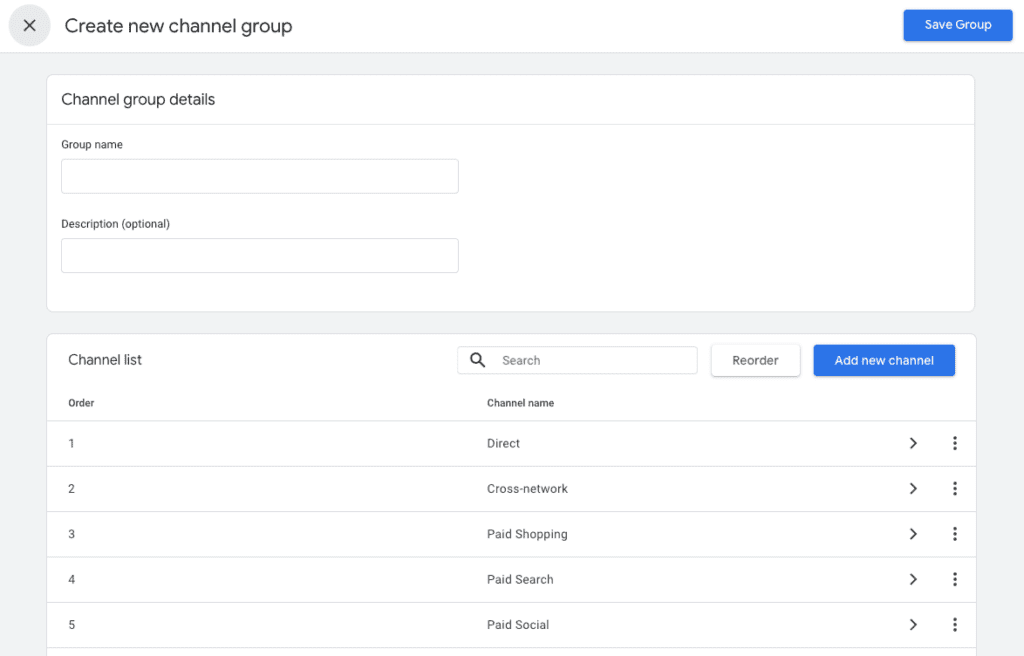
.*chatgpt\.com.*|.*perplexity.*|.*gemini\.google\.com.*|.*copilot\.microsoft\.com.*|.*openai\.com.*|.*claude\.ai.*|.*writesonic\.com.*|.*copy\.ai.*|.*deepseek\.com.*|.*huggingface\.co.*|.*blackbox\.ai.*To apply it, go to Admin > Custom Channel Groups in GA4, create a new channel, and set the condition to match Session Source against this regex. This gives you a consistent, auditable filter that you control and that won’t shift under you as Google quietly updates its own backend list.
Conclusion
GA4’s AI Assistant channel is a meaningful step toward making AI traffic visible and actionable. For most teams, it will surface attribution that was previously buried in Referral or Unassigned, with no manual setup required. That’s a real improvement.
But the gaps, particularly around mobile apps and Google’s own AI features, mean it shouldn’t be your only approach. Use the new channel as your foundation, supplement with a custom regex filter for more control, and connect AI traffic to your conversion events so you’re measuring impact, not just visits.
AI traffic no longer has to disappear into Unassigned or Direct. The visibility is there if you know where to look and how to fill in the gaps where it isn’t. Now is the time to get that foundation right.